0%

esp8266驱动1.8寸ST7355TFT屏幕(Arduino)

发现一块闲置的1.8寸ST7735的TFT屏幕,刚好还有一块esp8266板子,想到做一个时钟玩玩。

接线问题

笔者通过查找资料后,用下方接线方式成功驱动。

ESP8266 TFT屏
3.3V —— LED
D5 —— SCK
7D —— SDA
D3 —— A 0
D4 —— RESET
D8 —— C S
GND —— GND
VCC —— 3.3V

TFT_eSPI库更改

这时直接烧录代码大概率时知识屏幕亮了,但是不显示想要显示的内容,这是因为还要更改TFT_eSPI库中的User_Setup.h文件。

1、选择自己屏幕的驱动,不知道的可以看屏幕上的信息或者询问商家。将驱动那行取消即可。
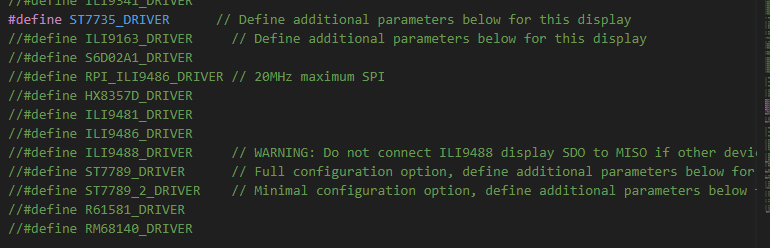
选择驱动

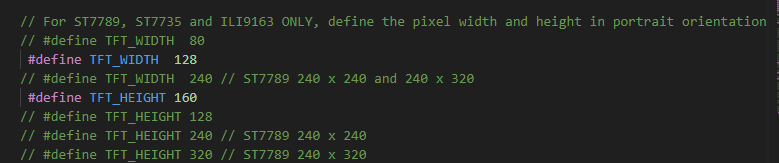
2、选择自己屏幕的尺寸。
选择尺寸

3、接线设置。默认的和下方是不一样的,经过前两项如果还不可以的话可以改成下方所示。

接线设置

时钟示例代码

代码为在太极创客教程的基础上进行更改。
若不可复制可点击此处获取代码

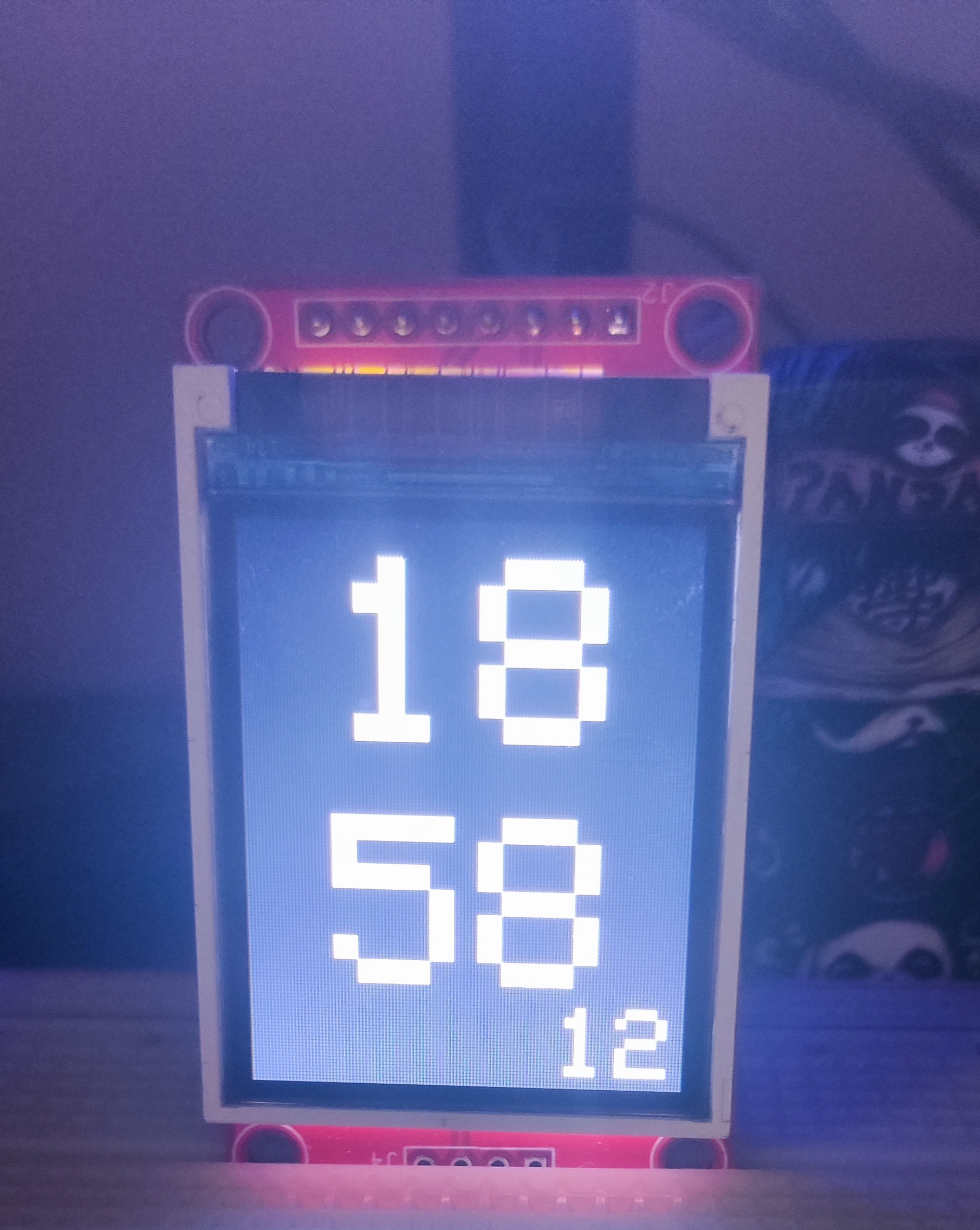
效果如图
1
2
3
4
5
6
7
8
9
10
11
12
13
14
15
16
17
18
19
20
21
22
23
24
25
26
27
28
29
30
31
32
33
34
35
36
37
38
39
40
41
42
43
44
45
46
47
48
49
50
51
52
53
54
55
56
57
58
59
60
61
62
63
64
65
66
67
68
69
70
71
72
73
74
75
76
77
78
79
80
81
82
83
84
85
86
87
88
89
90
91
92
93
94
95
96
97
98
99
100
101
102
103
104
105
106
107
108
109
110
111
112
113
114
115
116
117
118
119
120
121
122
123
124
125
126
127
128
129
130
131
132
133
134
135
136
137
138
139
140
141
142
143
144
145
146
147
148
149
150
151
152
153
154
155
156
157
158
159
160
161
162
163
164
165
166
167
168
169
170
171
172
173
174
175
176
177
178
179
180
181
182
183
184
185
186
187
188
189
190
191
192
193
194
195
196
197
198
199
200
201
202
203
204
205
206
207
208
209
210
211
212
213
214
215
216
217
218
219
220
221
222
223
224
225
226
227
228
229
230
231
232
233
234
235
236
237
238
239
#include <TimeLib.h>
#include <ESP8266WiFiMulti.h> // 本程序使用ESP8266WiFiMulti库
#include <ESP8266WiFi.h> // 调用ESP8266WiFi功能
#include <WiFiUdp.h>
#include <TFT_eSPI.h>
#include <TFT_eFEX.h>

#define BANNER_BG TFT_BLACK // 横幅背景色
#define BANNER_FG TFT_WHITE // 横幅文字色

ESP8266WiFiMulti wifiMulti; // 建立ESP8266WiFiMulti对象,对象名称是'wifiMulti'


// TFT屏幕显示相关对象和变量
TFT_eSPI tft = TFT_eSPI();
TFT_eFEX fex = TFT_eFEX(&tft);


// NTP服务
WiFiUDP Udp;
unsigned int localPort = 8888; // local UDP port
time_t prevDisplay = 0; // 上一次显示的时间

const int NTP_PACKET_SIZE = 48; // NTP time is in the first 48 bytes of message
byte packetBuffer[NTP_PACKET_SIZE]; //buffer to hold incoming & outgoing packets

static const char ntpServerName[] = "ntp.aliyun.com"; // ntp时间服务器地址
const int timeZone = 8; // 设置时区(8为北京时间)


void setup(){
Serial.begin(9600);

tft.begin();
tft.setRotation(2); // 设置屏幕显示方向
tft.fillScreen(TFT_BLACK); // 将屏幕填充黑色


connectWifi();

// ---NTP初始化---
ntpInit();
//tft.setTextDatum(TL_DATUM);
tft.setTextColor(BANNER_FG, BANNER_BG); //设置文字颜色和背景色
tft.setTextSize(15); //字体大小
tft.drawString(adjDigit(hour()), 25, 10);
tft.drawString(adjDigit(minute()), 25, 80);


}


void loop(){

if (timeStatus() != timeNotSet) {
if (now() != prevDisplay) { //update the display only if time has changed
prevDisplay = now();
// digitalClockDisplay();
tick(); // 计时函数
}
}


}

//连接WIFI
void connectWifi(){
//通过addAp函数存储 WiFi名称 WiFi密码
wifiMulti.addAP("CMCC-GJ7F", "88888888"); // 这三条语句通过调用函数addAP来记录3个不同的WiFi网络信息。


Serial.println("Connecting ..."); // 通过串口监视器输出信息告知用户NodeMCU正在尝试连接WiFi
int i = 0;
while (wifiMulti.run() != WL_CONNECTED) { // 此处的wifiMulti.run()是重点。通过wifiMulti.run(),NodeMCU将会在当前
delay(1000); // 环境中搜索addAP函数所存储的WiFi。如果搜到多个存储的WiFi那么NodeMCU
Serial.print('.'); // 将会连接信号最强的那一个WiFi信号。
} // 一旦连接WiFI成功,wifiMulti.run()将会返回“WL_CONNECTED”。这也是
// 此处while循环判断是否跳出循环的条件。


Serial.println('\n'); // WiFi连接成功后
Serial.print("Connected to "); // NodeMCU将通过串口监视器输出。
Serial.println(WiFi.SSID()); // 连接的WiFI名称
Serial.print("IP address:\t"); // 以及
Serial.println(WiFi.localIP()); // NodeMCU的IP地址
}


//--- NTP相关函数开始 ---
// ntp初始化
void ntpInit(){
Serial.println("Starting UDP");
Udp.begin(localPort);
Serial.print("Local UDP port: ");
Serial.println(Udp.localPort());
Serial.println("-------------");
setSyncProvider(getNtpTime);// 设置对时函数
setSyncInterval(10); // 每隔10秒钟对时一次


}
time_t getNtpTime(){
IPAddress ntpServerIP; // NTP server's ip address

while (Udp.parsePacket() > 0) ; // discard any previously received packets
Serial.println("Transmit NTP Request");
WiFi.hostByName(ntpServerName, ntpServerIP);
Serial.print(ntpServerName);
Serial.print(": ");
Serial.println(ntpServerIP);
sendNTPpacket(ntpServerIP);
uint32_t beginWait = millis();
while (millis() - beginWait < 1500) {
int size = Udp.parsePacket();
if (size >= NTP_PACKET_SIZE) {
Serial.println("Receive NTP Response");
Udp.read(packetBuffer, NTP_PACKET_SIZE); // read packet into the buffer
unsigned long secsSince1900;
// convert four bytes starting at location 40 to a long integer
secsSince1900 = (unsigned long)packetBuffer[40] << 24;
secsSince1900 |= (unsigned long)packetBuffer[41] << 16;
secsSince1900 |= (unsigned long)packetBuffer[42] << 8;
secsSince1900 |= (unsigned long)packetBuffer[43];
return secsSince1900 - 2208988800UL + timeZone * SECS_PER_HOUR;
}
}
Serial.println("No NTP Response :-(");
return 0; // return 0 if unable to get the time
}

// send an NTP request to the time server at the given address
void sendNTPpacket(IPAddress &address){
// set all bytes in the buffer to 0
memset(packetBuffer, 0, NTP_PACKET_SIZE);
// Initialize values needed to form NTP request
// (see URL above for details on the packets)
packetBuffer[0] = 0b11100011; // LI, Version, Mode
packetBuffer[1] = 0; // Stratum, or type of clock
packetBuffer[2] = 6; // Polling Interval
packetBuffer[3] = 0xEC; // Peer Clock Precision
// 8 bytes of zero for Root Delay & Root Dispersion
packetBuffer[12] = 49;
packetBuffer[13] = 0x4E;
packetBuffer[14] = 49;
packetBuffer[15] = 52;
// all NTP fields have been given values, now
// you can send a packet requesting a timestamp:
Udp.beginPacket(address, 123); //NTP requests are to port 123
Udp.write(packetBuffer, NTP_PACKET_SIZE);
Udp.endPacket();
}
//--- NTP相关函数结束 ---


//---时间显示相关函数开始
void displayTime(){
String timeString;
String dateString;
String dateTimeString;
String hour1, hour2 , minute1, minute2;
hour1 = adjDigit(hour());
minute1 = adjDigit(minute());

delay(1000);
hour2 = adjDigit(hour());
minute2 = adjDigit(minute());


if(minute1 != minute2)
{

tft.setTextPadding(10); //设置文字padding,覆盖旧字
tft.setTextSize(15); //字体大小
tft.drawString(minute2, 25, 80);

}

if(hour1 != hour2)
{

tft.setTextPadding(10); //设置文字padding,覆盖旧字
tft.setTextSize(15); //字体大小
tft.drawString(hour2, 25, 10);


}

tft.setTextPadding(10); //设置文字padding,覆盖旧字
tft.setTextSize(3); //字体大小
tft.drawString(adjDigit(second()), 90, 135);


}


String adjDigit(int number){
if (number >= 10){
return String(number);
} else {
return String("0" + String(number));
}
}

//---时间显示相关函数结束---


//--- 定时调用计时器函数 ---
void tick(){
displayTime(); // 每秒更新时钟显示
}


//
//void digitalClockDisplay()
//{
// // digital clock display of the time
// Serial.print(hour());
// printDigits(minute());
// printDigits(second());
// Serial.print(" ");
// Serial.print(day());
// Serial.print(".");
// Serial.print(month());
// Serial.print(".");
// Serial.print(year());
// Serial.println();
//}

void printDigits(int digits){
// utility for digital clock display: prints preceding colon and leading 0
Serial.print(":");
if (digits < 10)
Serial.print('0');
Serial.print(digits);
}

结语

笔者文笔功力有限,还请见谅。如有问题还请指出。

-------------本文结束感谢您的阅读-------------
学习分享,感谢支持。(可选)
  • 本文作者: 思寒忆雨
  • 本文链接: http://onlymhy.top/esp8266/
  • 版权声明: 本博客所有文章除特别声明外,均采用 BY-NC-SA 许可协议。转载请注明出处!

欢迎关注我的其它发布渠道